DIY dbt materializations
And what to do when they don't quite work the way you want them to.

dbt materializations. You know, the one you configure for each model that determines whether to output a ‘table’ or a ‘view’. What do you do when they don’t quite work for you? Or when you want to do something really custom in dbt?
Let’s say you want to create a UDF (user defined function) — there’s no pre-built materialization for that. That’s when you can define your own. But defining your own is not just about creating non-supported object types, it’s also for changing how things are executed for the ones we already support. Perhaps you want your table materialization to skip hooks? or perhaps run different queries depending on some metadata? Or wrap the create statement with exception handling to handle errors more gracefully.
I found out that this is really powerful, and that most of dbt’s “magic” lives in the materialization templates, so understanding those is really also understanding why and how dbt works.
In other words, regardless of whether you need to build a custom materialization, understanding the ones that already exists will help you understand dbt better.
Let’s learn this by example!
I’m using BigQuery, and they have the ability to create ML-models using just SQL! I can then call the ML-models as if they were regular tables. Let’s build a time series forecaster, and apply it using dbt!
But first a step back.
The materialization jinja2 template is (probably) the main orchestrator of dbt. It’s where all your other configuration is sent to the database/warehouse and executed. The script contains your pre-hooks, logic to e.g. run in a transaction, to overwrite existing tables — or drop them first, depending on the database, and setting metadata and docs. It can rename temp tables to the final destination, create configured indices etc.etc.
Let’s look at the source of the bigquery view materialization first. Why view? Well, because it’s pretty straightforward.
If you clicked that link, you’ve seen by now that it’s about 30 lines of jinja2, but also that most of the SQL happens in bigquery__create_or_replace_view so have a look at that one too!
If you read the code of that macro, you’ll see how the submitted query job will look. You’ll see that around row 23, we run pre_hooks. Then we check whether the view already exists, and potentially raise an error if we’re not allowed to overwrite.
The main execution happens in call statement('main') after which the grants config is executed to share the resource, and then another round of hooks (post this time). The main statement will simply create a “CREATE VIEW AS …” statment that’s submitted to bigquery.
So… with this pattern, we can construct our own materialization, let’s start with the minimum viable version.
Our own materialization
It appears that simply having a macro file with a “materialization” statement is enough to introduce a new materialization to dbt. Whatever happens in that statement, is what dbt will do when a model of that type is called.
Let’s make the most barebones one we can.
{% materialization ml_model, default %}
  -- target_relation will be used for persisting docs and will be returned to the caller
  {%- set target_relation = this.incorporate(type='table') %}
  -- run pre_hooks
  {{ run_hooks(pre_hooks, inside_transaction=False) }}
  -- run pre_hooks inside transaction (and start transaction)
  {{ run_hooks(pre_hooks, inside_transaction=True) }}
  -- build model, this is where the 'magic' happens
  {% call statement('main') -%}
    CREATE OR REPLACE MODEL {{ this }}
    OPTIONS
    (
      {% for k,v in config.get('options').items() -%}
      {{ k }} = {{ v|tojson }}{% if not loop.last %},{% endif %}
      {% endfor %}
    ) AS (
      {{ sql }}
    );
  {%- endcall %}
  -- run post_hooks inside transaction
  {{ run_hooks(post_hooks, inside_transaction=True) }}
  -- persist docs
  {% do persist_docs(target_relation, model) %}
  -- commit transaction
  {{ adapter.commit() }}
  -- run post_hooks outside transaction
  {{ run_hooks(post_hooks, inside_transaction=False) }}
  -- return target_relation to the caller
  {{ return({'relations': [target_relation]}) }}
{% endmaterialization %}
If you include above in your macros folder, you’ll be able to train ML models as regular dbt models. Here’s an example set of models implementing this:
# dummy_historical_data.sql
{{- config(materialized='table') -}}
SELECT
  date,
  2000.0 + -- baseline number
  (80 * (DATE_DIFF(date, "2024-01-31", DAY))) -- long term growth
  * (1 + MOD(EXTRACT(DAYOFWEEK FROM date), 5)/10) -- day of week pattern
  * (1+RAND()/4) -- noise
  AS sales
FROM
  UNNEST(GENERATE_DATE_ARRAY("2024-01-01", "2025-03-31")) AS date
This query will produce a time series like
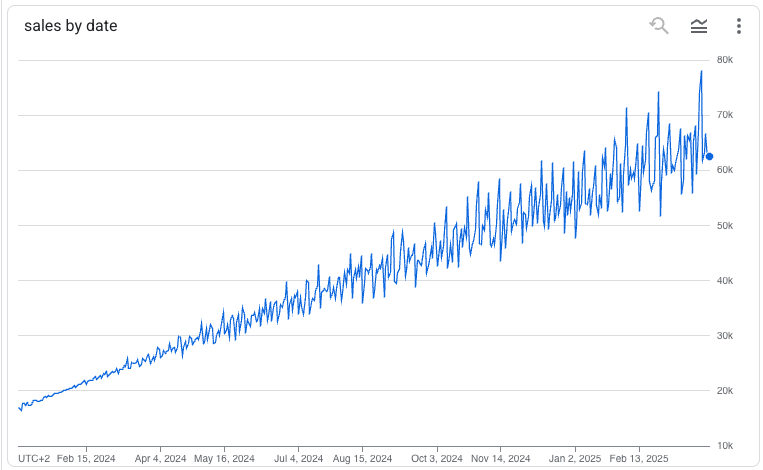
The dummy data can then be fed into the training like any other SQL statement in dbt.
# dummy_model.sql
{{- config(
  materialized='ml_model',
  options={
    'model_type':'ARIMA_PLUS',
    'time_series_timestamp_col':'date',
    'time_series_data_col':'sales',
    'auto_arima':True,
    'data_frequency':'AUTO_FREQUENCY',
    'decompose_time_series':True
  }
) -}}

SELECT
  date,
  sales
FROM
  {{ ref('dummy_historical_data') }}
The output of this model will be an ARIMA model, and using it in a downstream job doesn’t require any dbt magic. Simply do:
# dummy_model_inference.sql
{{- config(materialized='table') -}}

SELECT
  DATE(forecast_timestamp) AS date,
  forecast_value AS forecasted_sales_amount
FROM
  ML.FORECAST(
    MODEL  {{ ref('dummy_model') }},
    STRUCT(
      6 AS horizon,
      0.8 AS confidence_level
    )
  ) AS prediction
With these four files in place, you can now train and apply ML models in bigquery!
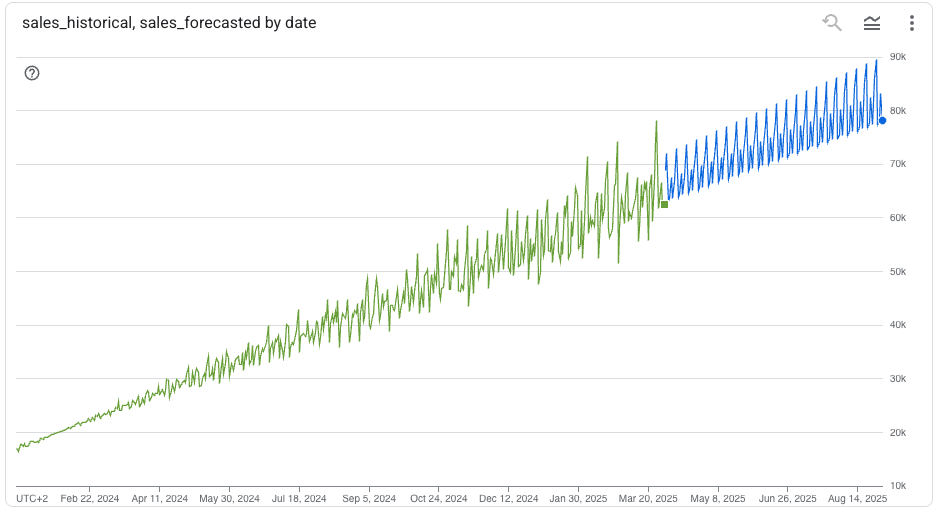
… but more importantly — and as you can see — this pattern can be used for so many things…
… Want a model that creates a table — but only on some condition? Just make a custom materialization that skips the main statement call if the condition isn’t fulfilled. I use a similar pattern to first check whether the input data & query has changed since the previous run, and if they’re the same, it just assumes the output is already in good shape and won’t run.
Good luck!